Table of contents
- What changed: Notion AI Agents are here (and why that matters)
- The two approaches: “native agent in Notion” vs scheduled runner
- Capabilities comparison: connectors, sharing, and “living in the wiki”
- Reliability & maintenance: what breaks in the real world
- Cost & token math: what you actually pay per run
- Where each wins (with concrete use cases)
- My default recommendations (and a simple decision checklist)
- CTA: if you want Eldur to set this up
1) What changed: Notion AI Agents are here (and why that matters)
Notion shipped AI Agents after a couple months of beta (Notion 3.3: Custom Agents release notes), and it’s a real shift: instead of “AI features” sprinkled across the product, you can now create an agent that runs a repeatable workflow, uses tools (connectors), and writes back into your workspace.
Notion is pushing some pretty specific use cases in the template marketplace: company wiki Q&A, recurring reporting, and “ops helpers” that keep systems up to date. That’s smart. Those are the workflows where the value comes from being embedded in your workspace, not from the model being a little better at writing.
But there are limits right now, and they matter if you’re making a tooling decision:
- Some workflows are still clunky to scope, test, and observe (especially if you’re used to developer-grade logs).
- Connector reliability is still a factor (more on that below).
- Pricing is not trivial. Notion even built a spend-forecast visualization because people were (fairly) anxious about “agent runs” turning into a surprise bill (see Introducing Custom Agents for the credits/pricing overview).
So the question I keep getting is: should I use Notion agents, or should I keep running my scheduled automations elsewhere?
2) The two approaches: “native agent in Notion” vs scheduled runner
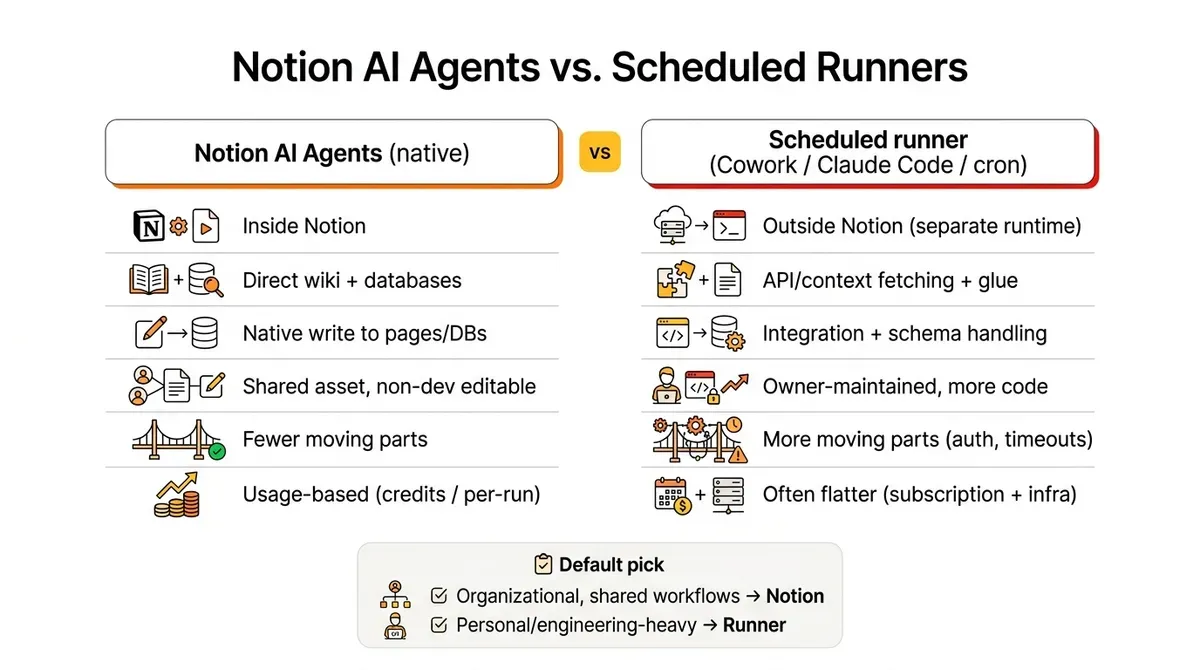
If you strip away the hype, you’re deciding between two patterns:
Pattern A: Native Notion AI Agent
- Runs inside Notion
- Reads your workspace content directly
- Writes output directly into pages/databases
- Can be shared with a team, improved collaboratively, and reused
Pattern B: Scheduled task runner (Cowork-style, Claude Code routines, cron jobs)
- Runs outside Notion on a schedule
- Uses APIs/MCP tools to pull context and push results back
- Usually has better engineering affordances (logs, retries, versioning)
- Often cheaper if you already pay a flat model subscription
We built a four-agent Notion enrichment workflow on exactly this scheduled-runner pattern — 200 hours of LinkedIn research replaced with a 2-hour agent.
During beta I built the same “skills + prompt” as both:
- Notion AI agent workflows
- Cowork scheduled tasks
- A few routines in Claude Code
Notion uses Anthropic under the hood for agent execution, so my baseline assumption is: if you give them the same context and constraints, the writing quality will be comparable. The differentiator isn’t “which one writes better.” It’s everything around the run.
3) Capabilities comparison: connectors, sharing, and “living in the wiki”
Here’s where Notion’s approach gets interesting.
Sharing and iteration
If an agent is inside your workspace, it becomes a team asset:
- someone can tweak instructions without shipping code
- you can point it at a database view
- you can standardize “how we do X every week” as an executable workflow
That’s hard to replicate with a personal automation stack, even if it’s technically more powerful.
Connectors (especially email)
One very practical example: I run a “morning brief” style workflow that pulls from multiple inboxes.
Notion lets me connect and read multiple Gmail accounts cleanly. In Cowork, this has been more limited, so I’ve used a Superhuman connector as a workaround.
If your workflow depends on pulling signal from more than one account (personal + company + shared inbox), this detail matters more than most feature checklists.
“Auto-import your company wiki”
Notion agents also have a native advantage: your wiki isn’t a separate integration target. It’s the home environment. You’re not constantly re-fetching context or worrying about permissions mismatches across systems.
That “it lives where the knowledge lives” benefit is real, especially for:
- internal SOP helpers
- recurring reporting against your own databases
- content operations (briefs, audits, repurposing) — the kind of system laid out in The Multi-Agent Marketing Pyramid
4) Reliability & maintenance: what breaks in the real world
This is the least sexy part, and it’s the part that determines whether something stays in your weekly routine.
In my experience, external scheduled runners (Cowork / MCP-heavy setups) are more likely to fail in ways that require babysitting:
- connectors disconnect
- tool auth expires
- “API Error: stream idle timeout” and similar partial-response failures
- “MCP tool not connected” at runtime
Notion connectors aren’t perfect either (I had multiple connector breakages during beta), but when the workflow is native, the failure modes are generally simpler:
- fewer moving parts
- fewer “context transfer” steps
- fewer places where state can get out of sync
If you’re running something weekly for a business (SEO audit, pipeline reporting, executive summary), the winner is the one you’ll still trust in three months.
5) Cost & token math: what you actually pay per run
Here’s the uncomfortable truth: for personal productivity agents, paying per run inside Notion can be hard to justify if you already have a Claude/ChatGPT subscription and you can run the exact same thing externally.
A concrete example from my own testing:
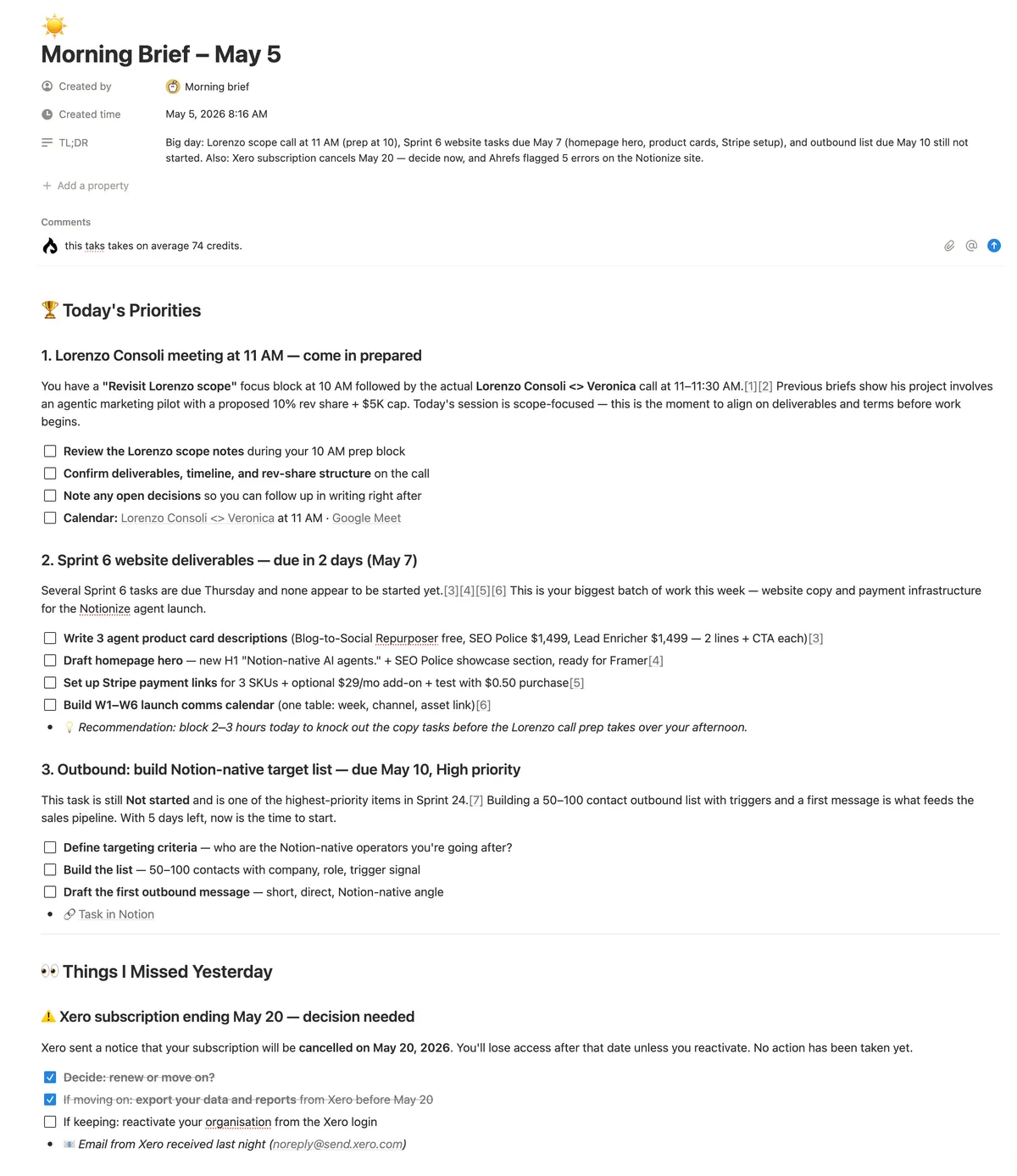
- A “morning brief” run in Notion that looks at 3 email clients, slack & calendar and of course Notion as a task manager came out around $0.74.
That may be fine if:
- it’s a team workflow that replaces manual labor
- it prevents real business mistakes (missed follow-ups, missed anomalies)
- it’s running for multiple people off a shared system
But if it’s just “my personal daily summary,” you’re often better off running it in your existing AI subscription environment.
The pricing question to ask isn’t “is $0.74 expensive?” It’s:
- What’s the value of the output?
- How many people benefit?
- How often will it run?
- What’s the cost of it breaking?
6) Where each wins (with concrete use cases)
Notion AI Agents win when…
- The workflow is a shared asset
- e.g. “weekly SEO police” audit that the whole team relies on
- The output needs to land in Notion with the right shape
- e.g. updates to a database, recurring checklists, standardized reports
- Non-developers need to tune it
- prompts, instructions, and iteration in Notion are simply more accessible
- The context is your wiki and your systems
- you want fewer integrations and less glue code
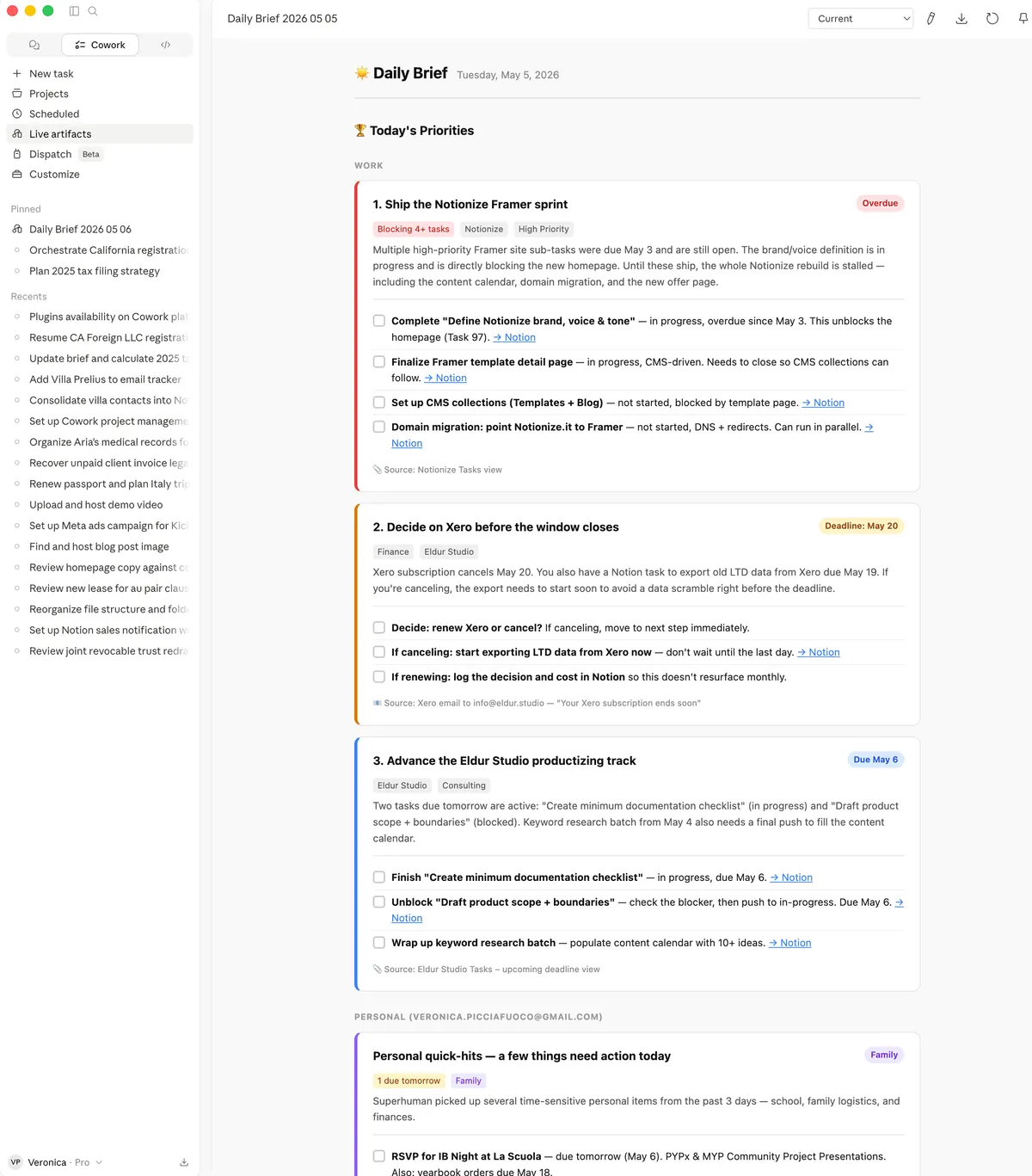
I’ve been comparing weekly SEO audit results from Claude vs a Notion agent (see screeshot below), and the interesting part isn’t just output quality (which is slightly different despite the prompt being exactly the same and the model being the same), but also stability (does it break often? Is it easy to fix / reconnect? ), ease of share and iterate, and of course, cost and scalability.
Scheduled runners win when…
- You already have a strong automation stack
- logs, retries, version control, strong observability
- You need complex orchestration
- multi-step tool chains, conditional branching, heavy API work
- Cost needs to be flat / predictable
- if runs spike, you don’t want usage-based surprise bills
- It’s primarily personal productivity
- no need to “productize” the workflow inside Notion
7) My default recommendations (and a simple decision checklist)
If you want my bias in one line:
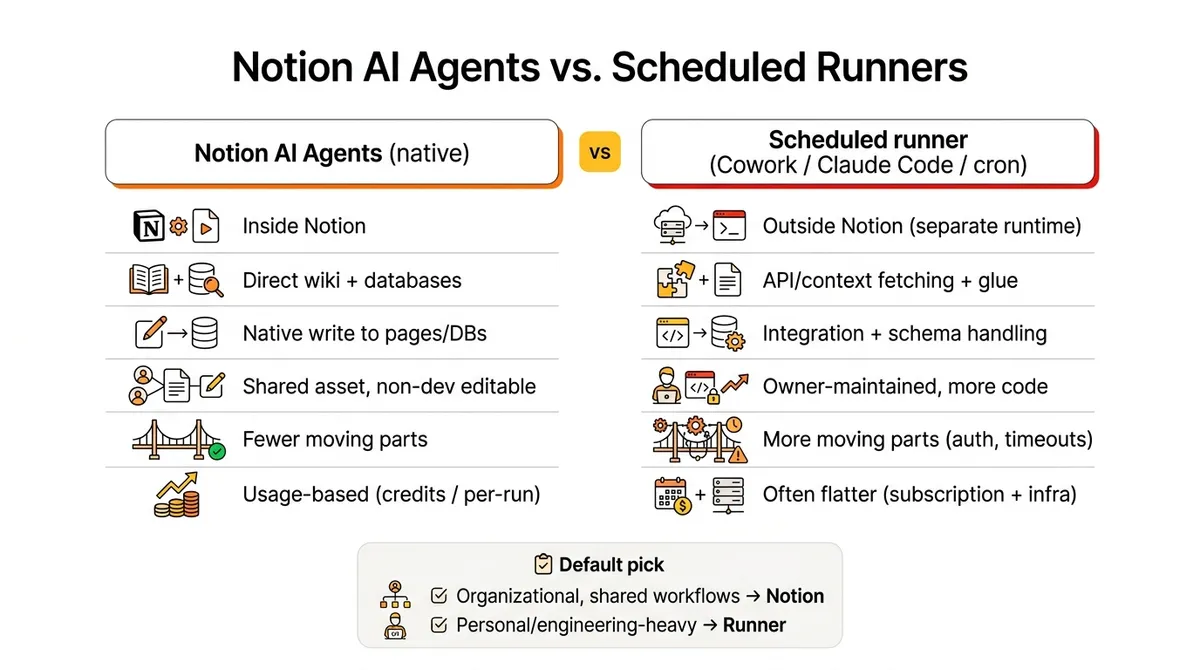
- Use Notion AI Agents when the work is organizational (shared, repeatable, system-owned) or very Notion-centric (one of the possible triggers in Notion is a property change in any database, this could be only replicated with a webhook which is not supported in co-work (but now possible with Claude Managed Agents)
- Use a scheduled runner when the work is engineering-heavy or purely personal.
Decision checklist:
- Does the workflow touch shared company knowledge and need to write back into Notion? → Notion agent
- Does it need to be editable by non-devs and reused across people? → Notion agent
- Does it need robust logging, retries, and complex orchestration? → scheduled runner
- Are you already paying a flat model subscription and the workflow is “nice to have”? → scheduled runner
- Would a failure create real business risk? → pick the environment you can monitor and trust
8) Bonus: if you want need help setting set this up
If you’re deciding between Notion agents and an external runner for a real workflow (SEO audits, inbox triage, pipeline reporting, ops checks), but really you just want to save time and get this up and running, Eldur Studio can build it for you! Reach out and let’s build your first agent in the platform that makes most sense for you / your company.
Comparison table
| Dimension | Notion AI Agents (native) | Scheduled runner (Cowork / Claude Code routines) |
|---|---|---|
| Best for | Shared, repeatable workflows that should live in the workspace | Engineering-heavy or personal workflows; complex orchestration. For shared workflows now Managed Agent available using API. |
| Where it runs | Inside Notion | Claude Desktop (separate runtime) - uses your subscription tokens and limits (see Cost model below) |
| Context access | Direct access to pages/databases; “lives with the wiki” | Must fetch context via folder, or APIs/connectors that can randomly disconnect and occupy context |
| Write-back (to Notion or other system of record) | Native: writes directly into Notion docs/DBs in the right shape. Can send to email natively or to Google Drive. | Quite reliable using Notion MPC. Saves to a local folder or other MCP-connected solution |
| Sharing | High: team asset; non-devs can iterate instructions. Marketplace of agents easy to duplicate. | Can’t share across teams (besides copy/pasting instructions) - need to use Managed Agents for team use. |
| Iteration and self improvement | Easy, but manual. Agent will suggest improvements if you chat with it. | Easy to iterate manually, fixes its own errors and suggest improvements. Managed agent |
| Email/connectors | Everything available in Notion, which is a lot by now (Drive, Calendar, Asana, Github). Does support multiple gmail accounts | Notably supports only one gmail account, I use a workaround (Superhuman MCP) to connect my personal email as well). |
| Reliability failure modes | Fewer moving parts; still subject to MCP connector hiccups. Works remotely. | More moving parts; auth expiry, tool disconnects, stream timeouts, you run out of tokens, etc. You have to have your computer on (even if sleeping) |
| Observability (logs/retries) | Improving, but not “developer-grade” - can fix itself. | Like Claude Code: logs, retries, No versioning ora advanced controls unless you use Managed Agents |
| Cost model | Need a business plan or higher with Notion AI. Usage-based (credits / per-run). Currently $10 for 10000 credits. Can be great for high-leverage team workflow, but no economies of scale for large teams for daily routines. | Often flat if you already pay for a model subscription, but also subject to its limit. Could be run on Console as Managed Agent now using API rates by model. Limited to 5 daily routines with the Pro account (Claude Code) |
| My default pick when… | Output writes back to Notion. Organizational work: shared, durable, can be duplicated by others. | It’s personal or engineering-heavy: complex chains, strict control, predictable cost |