Everyone is calling things “agents” right now. A chatbot with a system prompt. A workflow with one API call. A demo that runs once on stage and never again.
The difference matters because it changes what you can trust the thing to do. A real agent doesn’t just respond to you. It decides what to do next, remembers enough to stay consistent, and takes action on its own.
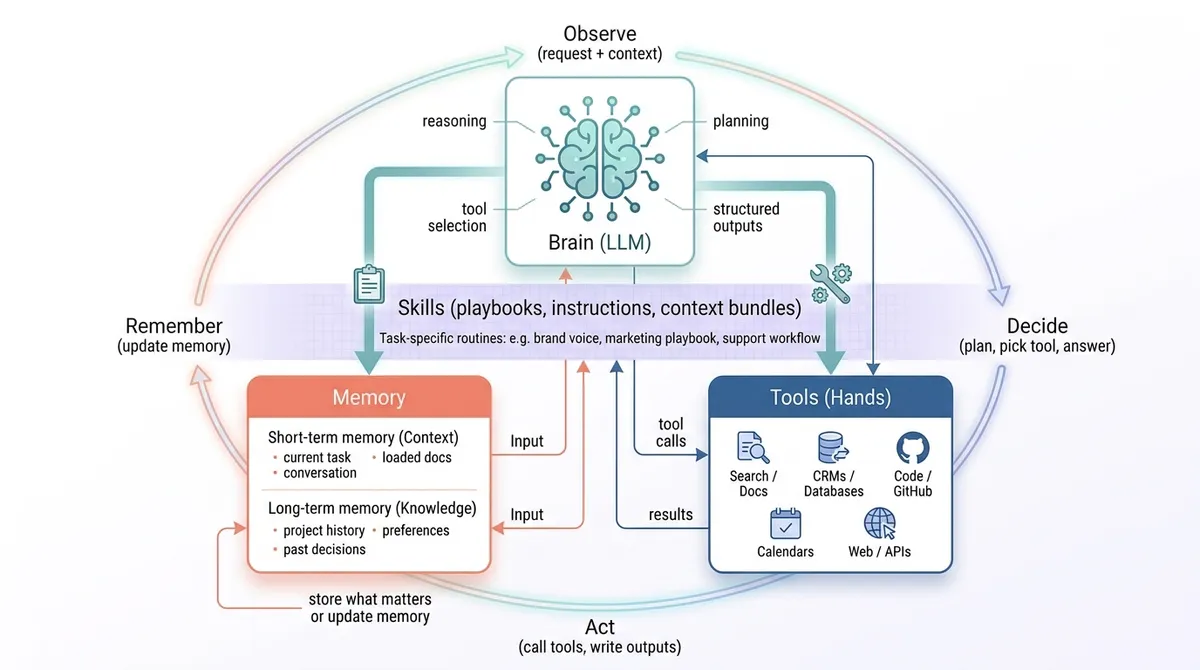
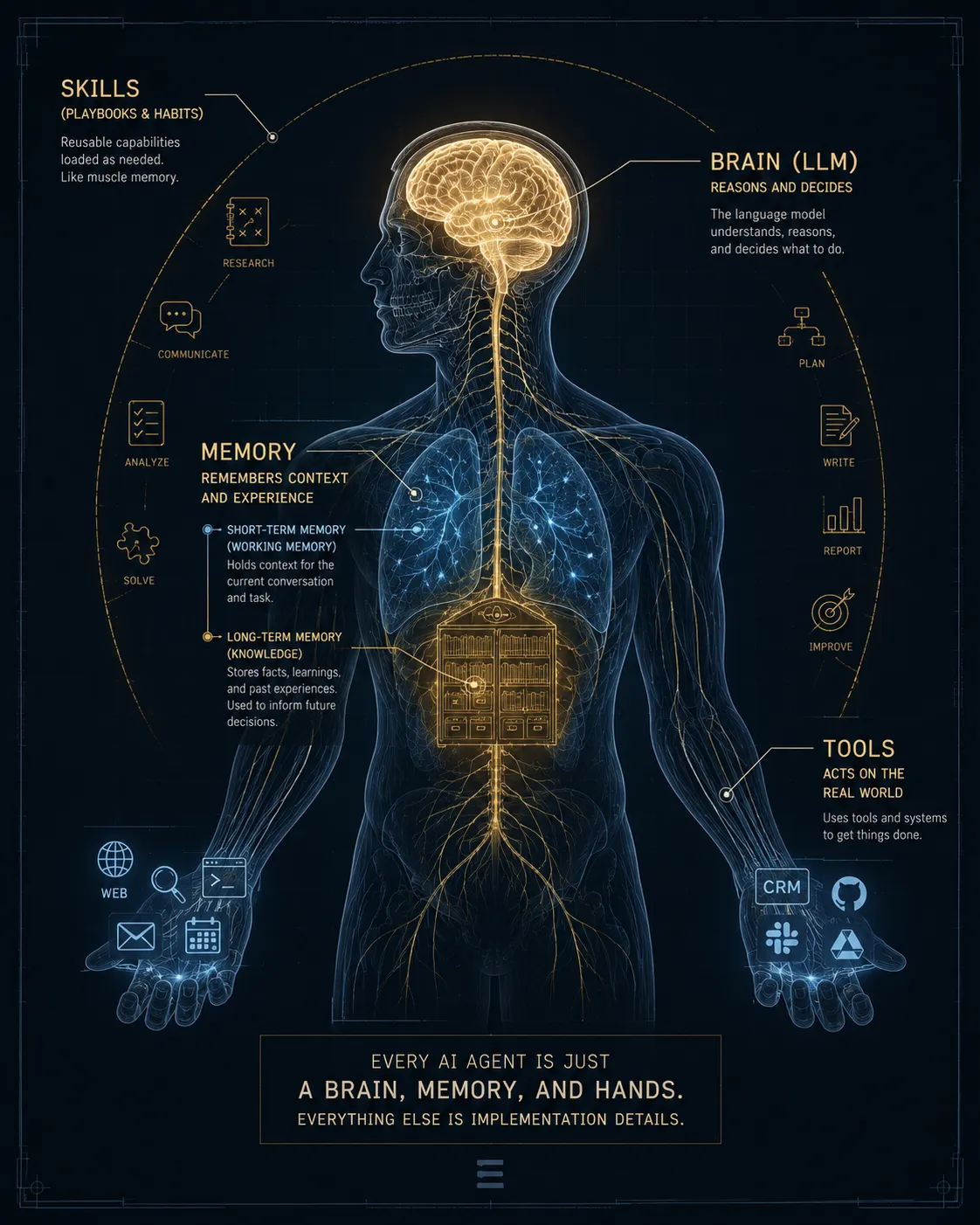
Every working agent is built from the same three parts:
- The brain (the LLM)
- Memory
- Tools (the hands)
Learn these three, and you can size up any “agent” product in about five minutes. You can also design your own without drowning in framework documentation.
People keep asking where “skills” fit in all this. They do belong, but on top of these three, not beside them. Hold that thought; it lands once the parts make sense.
The brain: the LLM doing the reasoning
The brain is the model that handles reasoning and language — GPT-4o, Claude 3.5 Sonnet, whatever you’ve wired in. The brand matters less than people think. What matters is the job you’re asking it to do.
At minimum, the brain has to:
- Read the situation: your request plus whatever context it can see
- Decide the next move: answer now, ask a question, or reach for a tool
- Produce something structured: a plan, a tool call, a clean summary
If you want reliability, you want the brain producing constrained output, not free-flowing prose. A tool call with a defined shape. A checklist. A plan with explicit steps. An answer that matches a format you can check.
Here’s where most brains go wrong:
- Overconfidence. It invents a fact instead of looking it up.
- Drift. It forgets the goal halfway through a long run.
- Style over substance. It sounds convincing and does none of the actual work.
The fix is almost never a bigger model. It’s tighter constraints, cleaner context, and a loop that forces the agent to check its own work before it calls something done.
Memory: short-term and long-term
An agent with no memory is a goldfish. It can reason in the moment, but it can’t build on anything. Two kinds of memory do the work here.
Short-term memory: the working context
This is everything the agent can see right now:
- The task instructions
- The current conversation
- Any documents you’ve loaded in
- The notes it writes to itself mid-task
Even if you never touch a database, you have short-term memory. It’s the context window. And this is where a lot of agents quietly fall apart: people stuff in everything they can, the signal drowns in noise, and more context makes the agent worse. Curation beats volume.
Long-term memory: what carries across sessions
This is what lets an agent get better over time instead of starting from zero every run:
- Facts about a project
- Past decisions and why they were made
- What you prefer and what you’ve rejected
- Patterns it keeps running into
You can store this in a vector database like Pinecone, a normal database with a sensible schema, or a knowledge base like Notion. The mechanism varies. The pattern doesn’t:
- Capture what matters
- Store it somewhere retrievable
- Pull back the right pieces when the task calls for them
The trap is hoarding. Store everything and retrieval turns to garbage, because the agent can no longer tell what’s relevant. Long-term memory needs editing, the same way good notes do.
Tools: the hands that touch the real world
Tools are the line between an assistant and an operator. Without them, the model can only talk. With them, it can search the web, query your docs, update a CRM, open a pull request in GitHub, generate an image, or book a meeting.
Without tools, the smartest model in the world is still just a very confident writer.
Tools need a real interface
For the model to call a tool safely, you have to describe it properly:
- A name
- An input schema
- What it gives back
- Permissions and limits on what it’s allowed to do
This is exactly why the Model Context Protocol (MCP) is becoming a standard. It’s a consistent way to expose tools and data sources to a model. If you’ve wired up an MCP server, you’ve felt the shift: integrations stop being a custom project for every app and start being something you plug in.
Tool reliability is the real bottleneck
Most agent failures have nothing to do with the model being too dumb. They come from the plumbing:
- Tool errors that aren’t handled
- Outputs the model can’t interpret
- Confusing, contradictory, outdated instructions
That said, sometimes the MCP server disconnects. But then we get to try again for free.
Where skills fit: a layer, not a fourth part
You’ll notice skills aren’t on the list of three. That’s deliberate. A skill isn’t a fourth organ next to the brain, memory, and tools. It’s a packaged playbook the brain loads when a task matches.
Think of a skill as three things bundled together:
- Instructions for how to handle a specific kind of work
- Context the agent should pull in: examples, rules, reference docs
- Optional tools or scripts that the task tends to need
The model stays the same. The skill changes what the model knows and how it behaves for one job, so you don’t re-explain it every run.
A concrete example from our own setup: when this agent writes anything for us, it loads the Eldur Studio brand voice skill. That one file carries the voice rules, the words we avoid, and the structure we want, then points to the reference docs behind them. The brain didn’t get smarter. It got briefed.
So where do skills sit in the anatomy? On top of it. They’re how you turn a capable agent into an agent that does your work, the way you want it done — by teaching the three parts a repeatable routine instead of starting from scratch each time.
How the three parts run together
Strip the loop down to its bones and it looks like this:
- Observe. Read the request and the relevant context.
- Decide. Think, plan, or pick a tool.
- Act. Make the call or write the output.
- Remember. Store what’s worth keeping.
- Repeat until the work is actually done.
A loaded skill doesn’t add a step to this loop — it primes the ones already there, shaping how the agent observes, what counts as a good decision, and when the work is done for that kind of task.
Frameworks mostly differ in how they run this loop and how much control they hand you over each step. The anatomy underneath stays the same.
A quick test: is it really an agent?
When a product calls itself an agent, ask four questions:
- Can it take action through tools, with no copy and paste from you?
- Can it run multi-step work and check itself along the way?
- Can it remember anything from one session to the next?
- Can you constrain what it does, with permissions and confirmations?
If it can’t do the first one, it isn’t an agent. It’s a chatbot with a better landing page.
Skills don’t show up on this list on purpose. They’re what turn a capable agent into a genuinely useful one, but a tool can pass every question here without a single skill loaded.
Where this lands for a small team
This isn’t abstract if you run marketing or ops with a lean team. The three parts map straight onto real work:
- Brain: picks the next move and writes the first draft
- Memory: your brand voice, your positioning, what’s performed before, the context on each customer
- Tools: keyword research APIs, your CMS, your CRM, GitHub, analytics, the task tracker
- Skills: your repeatable playbooks — how you draft a post, qualify a lead, or run a launch — so the agent does each job your way without a fresh briefing every time
The teams getting leverage out of AI aren’t the ones with the flashiest model. They’re the ones who got memory and tools right, so the agent runs quietly in the background and only surfaces when something genuinely needs them.
For the marketing-specific version of this, read How AI Agents Are Changing B2B Marketing (And What to Do About It).
If that’s the direction you’re headed, these go deeper:
- How AI Agents Are Changing B2B Marketing (And What to Do About It)
- The Multi-Agent Marketing Pyramid: Orchestrator + Specialists
- Notion AI Agents vs. Cowork: Scheduled Task Automation Compared
- Can Claude be your Webflow dev? A look at the updated MCP
- Building HIPAA-compliant AI agents
Where to start
If you want an agent that ships real work instead of a demo that impresses once, write down four things before you build anything:
- The decision loop, including what “done” actually means
- The memory you need, and just as important, what you should refuse to store
- The smallest set of tools that can produce one real outcome
- The first skill worth packaging — the one task you explain the same way over and over
That’s the foundation. Everything else is detail.
Want a second pair of eyes on the agent you’re designing? I’ll walk through what this looks like for your setup.
— Veronica